Stereo Measurement
Overview
This document corresponds to the stereo measurement example folder within a VIAME desktop installation. This folder contains examples and pipelines for computing real-world size measurements of objects (e.g., fish length) from a calibrated pair of cameras.
Stereo measurement triangulates 3D positions from the two views and computes real-world distances between them. It is the most accurate approach and works at varying depths and distances. It requires a stereo calibration file containing camera intrinsic and extrinsic parameters (see Calibration). Stereo measurement pipelines detect or accept annotated objects in both left and right camera views, establish correspondences between them, and triangulate keypoints (e.g., head and tail) to compute lengths.
When only one camera is available, see monocular measurement, which measures from the camera’s height above the scene instead.
Calibration
Every stereo measurement pipeline requires a calibration file describing the camera pair: the intrinsics and lens distortion of each camera, and the rotation and translation between the two. Lengths are reported in the units the calibration was made in, so a target measured in millimeters gives lengths in millimeters.
A calibration can be read from any of the following formats:
- JSON (
.json), as written by the VIAME calibration pipelines andviame calibrate - OpenCV YAML (
.ymlor.yaml), or a folder holdingintrinsics.ymlandextrinsics.yml - NumPy archive (
.npz) - MATLAB (
.mat) - SEAGIS
.CamCAL, with the SEAGIS add-on
A calibration made in another tool (e.g., OpenCV, the MATLAB Camera Calibrator or SEAGIS) can therefore be used as it is; the contents expected of each format are listed under Calibration File Format. Otherwise one is generated within VIAME from images or video of a calibration target, as below.
Generating a Calibration
Two kinds of calibration target are supported:
- A checkerboard (chessboard) pattern
- Any target made up of bright points on a dark background, such as a grid of white dots or the markers on a calibration frame
By default a checkerboard is looked for first, and bright points if none is found. Bright points are located as blobs and refined to sub-pixel centers, and isolated ones away from the target, such as labels and reflections, are discarded. Detected corners or centers are accumulated across frames and used to solve for the camera intrinsics, distortion coefficients, and (for stereo) extrinsic parameters.
The square_size parameter must be set to the real-world size of a checkerboard square (or the spacing of the points) in your chosen unit (e.g., millimeters) – this value determines the scale of all subsequent measurements. When running from the DIVE interface, the pipeline will prompt for the checkerboard square size in real units before running.
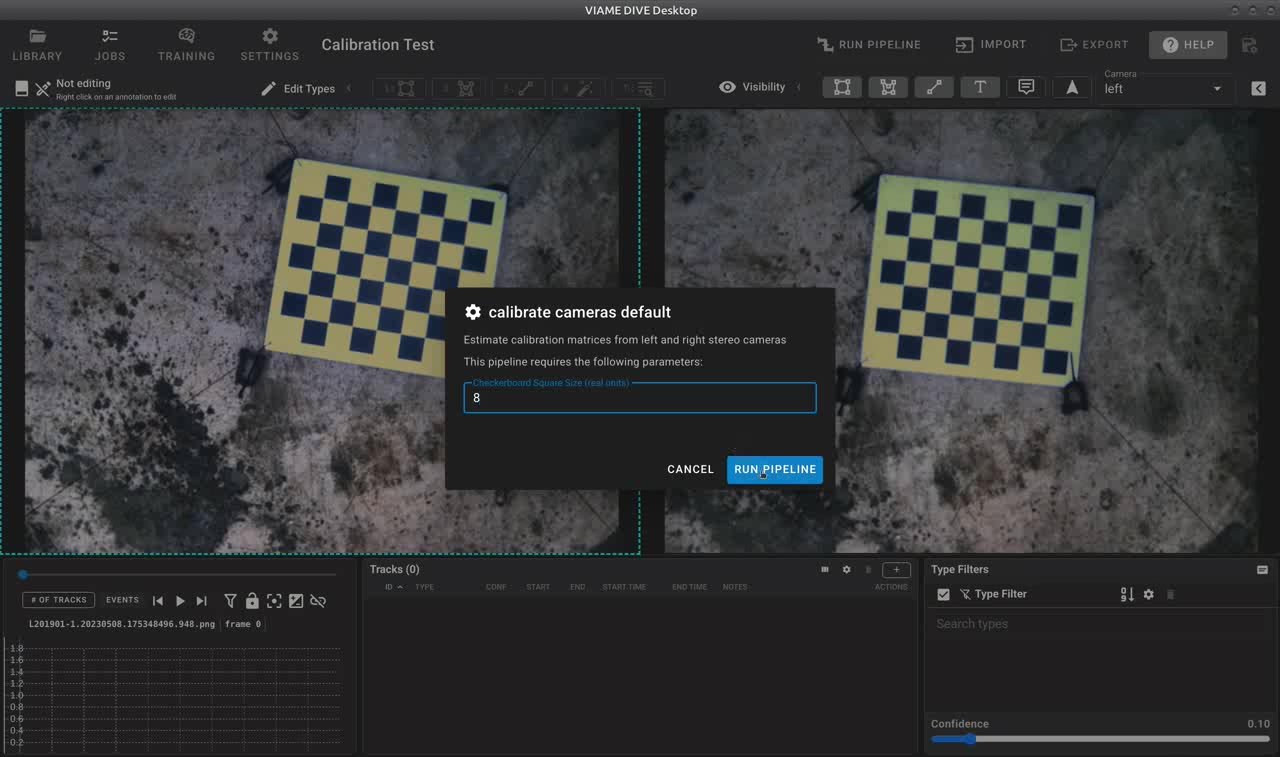
The DIVE calibration dialog prompts for the checkerboard square size before running the calibration pipeline.
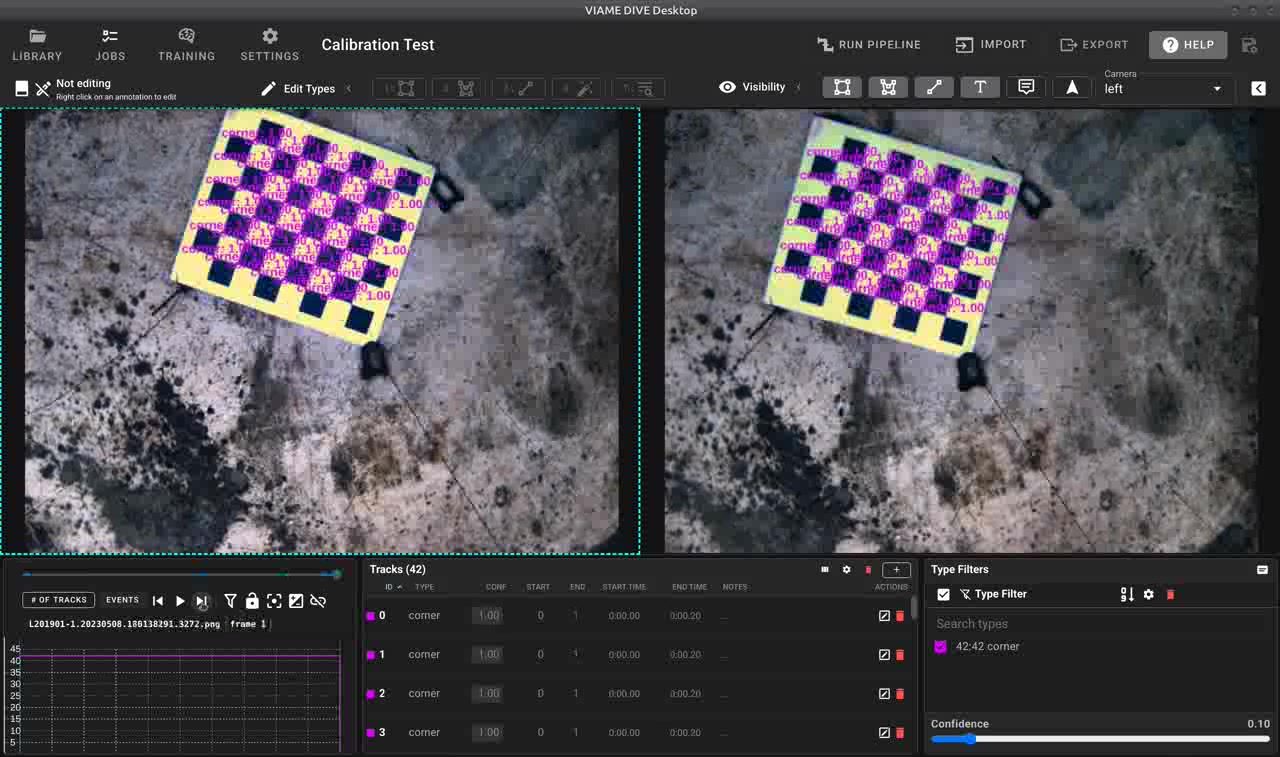
Successful stereo calibration showing detected feature correspondences between left and right camera views.
Calibration Pipelines
stereo_calibrate_cameras_default.pipe
Stereo camera calibration from separate left and right camera inputs. Detects chessboard corners in both views, accumulates correspondences across frames, and computes stereo calibration matrices. Outputs calibration_matrices.json. This is the recommended pipeline for most stereo calibration tasks.
stereo_calibrate_cameras_fast.pipe
A faster variant of the stereo calibration pipeline that uses fewer frames (threshold of 25 vs. the default). Use this when you have a large number of calibration frames and want quicker results at the cost of slightly reduced accuracy.
utility_calibrate_single_camera.pipe
Monocular (single camera) calibration from images of a chessboard target. Outputs calibration.json. Useful as a preliminary step before stereo calibration; see monocular measurement for its use on its own.
utility_calibrate_stitched_stereo_pair.pipe
Calibrates a stereo pair from a single video or image input where left and right frames are horizontally concatenated (stitched side-by-side). The pipeline splits each frame, detects chessboard corners in both halves, and computes stereo calibration. Outputs calibration_matrices.json. Useful for cameras that record both views into a single file.
To run a calibration pipeline from the command line, for example with separate camera inputs:
source /path/to/VIAME/install/setup_viame.sh
kwiver runner configs/pipelines/stereo_calibrate_cameras_default.pipe \
  -s input1:video_filename=cam1_images.txt \
  -s input2:video_filename=cam2_images.txt \
  -s global:square_size=25.0
The viame calibrate tool runs the same calibration without a pipeline:
viame calibrate --left left_video.mp4 --right right_video.mp4 \
  -a -q 25 -o calibration_matrices.json
Here -a detects the grid size and -q is the square size. For a target whose bright points do not lie on a regular grid, --dots --pts <file> takes the 3D position of each point from a PtsCAL file in place of the square size.
Calibration File Format
A JSON file holds fx, fy, cx, cy, k1, k2, p1, p2 and k3 for each camera, suffixed _left or _right (e.g., fx_left), along with the rotation matrix R and translation vector T.
An OpenCV YAML file, or folder of intrinsics.yml and extrinsics.yml, holds the camera matrices M1 and M2, the distortion coefficients D1 and D2, and R and T.
For the npz file format the root object should be a python dict with the following keys and values:
- R: extrinsic rotation matrix
- T: extrinsic translation
- cameraMatrixL: dict of intrinsic parameters for the left camera
- fc: focal length
- cc: principal point
- alpha_c: skew
- cameraMatrixR: dict of intrinsic parameters for the right camera
- fc: focal length
- cc: principal point
- alpha_c: skew
- distCoeffsL: distortion coefficients for the left camera
- distCoeffsR: distortion coefficients for the right camera
For the mat file, format the root structure should be a dict with the key Cal whose value is a dict with the following items:
- om: extrinsic rotation vector (note rotation matrix is rodrigues(om))
- T: extrinsic translation
- fc_left: focal length of the left camera
- cc_left: principal point
- alpha_c_left: skew
- kc_left: distortion coefficients for the left camera
- fc_right: focal length of the right camera
- cc_right: principal point
- alpha_c_right: skew
- kc_right: distortion coefficients for the right camera
Measurement Pipelines
Measurement can be run on annotations that already exist, or fully automatically from detection through to length.
Stereo Disparity and Depth Pipelines
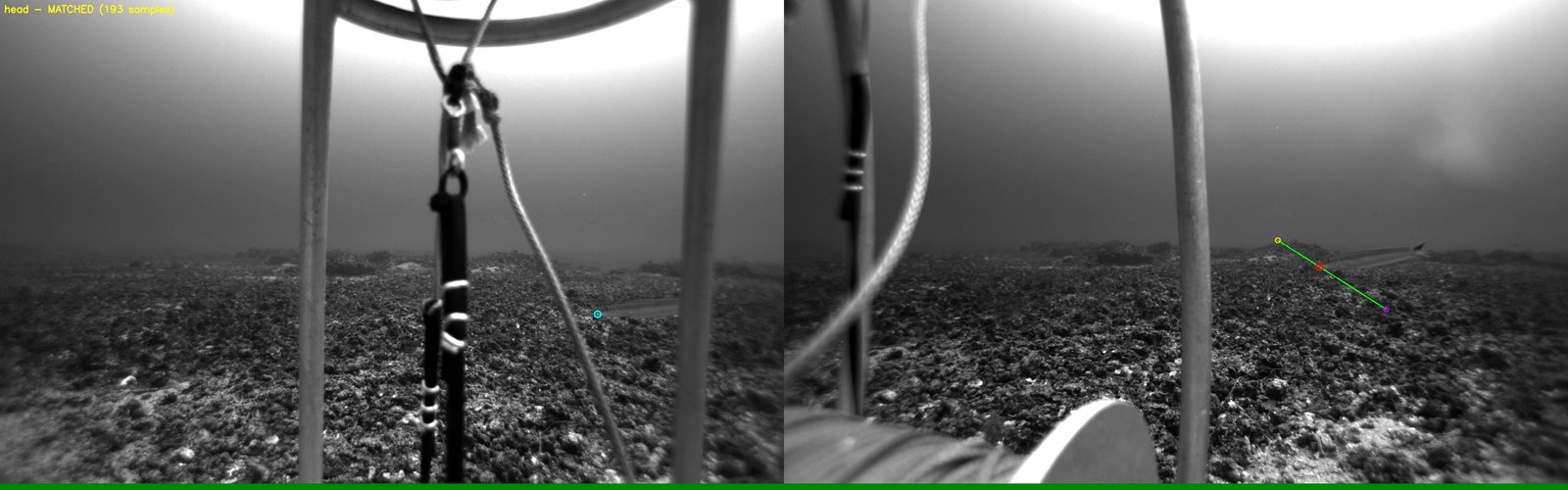
Stereo epipolar matching: a point selected in the left camera (cyan) is matched to its correspondence in the right camera (green/red) using epipolar geometry.
VIAME includes several methods for computing stereo disparity and depth maps, which are used internally by the measurement pipelines and can also be run standalone for visualization or custom processing. Each requires a calibration file, see Calibration.
stereo_compute_rectified_disparity.pipe
Computes rectified stereo disparity maps using the SGBM (Semi-Global Block Matching) algorithm with WLS filtering. Requires a pre-computed camera calibration file. Useful for visualizing depth or feeding into custom measurement workflows.
filter_stereo_depth_map.pipe
Filters and enhances stereo depth maps from horizontally concatenated stereo images. Applies CLAHE contrast enhancement and denoising before computing OCV stereo disparity. Outputs filtered depth map images.
Foundation Stereo (add-on)
The Foundation Stereo add-on provides a deep learning-based stereo disparity model that produces higher quality depth estimates than traditional SGBM. It is available in three model sizes: vits (small, faster), vitb (base), and vitl (large, more accurate). The small variant is recommended for most use cases. Foundation Stereo is used by the stereo_measure_current_annots_fdn_stereo_s.pipe pipeline and can be enabled by installing the Foundation Stereo add-on.
Measurement from Annotations Pipelines
These pipelines compute stereo measurements from user-provided annotations (e.g., head/tail keypoints on fish). They read left and right camera track files, match detections between cameras, and triangulate 3D positions to compute lengths.
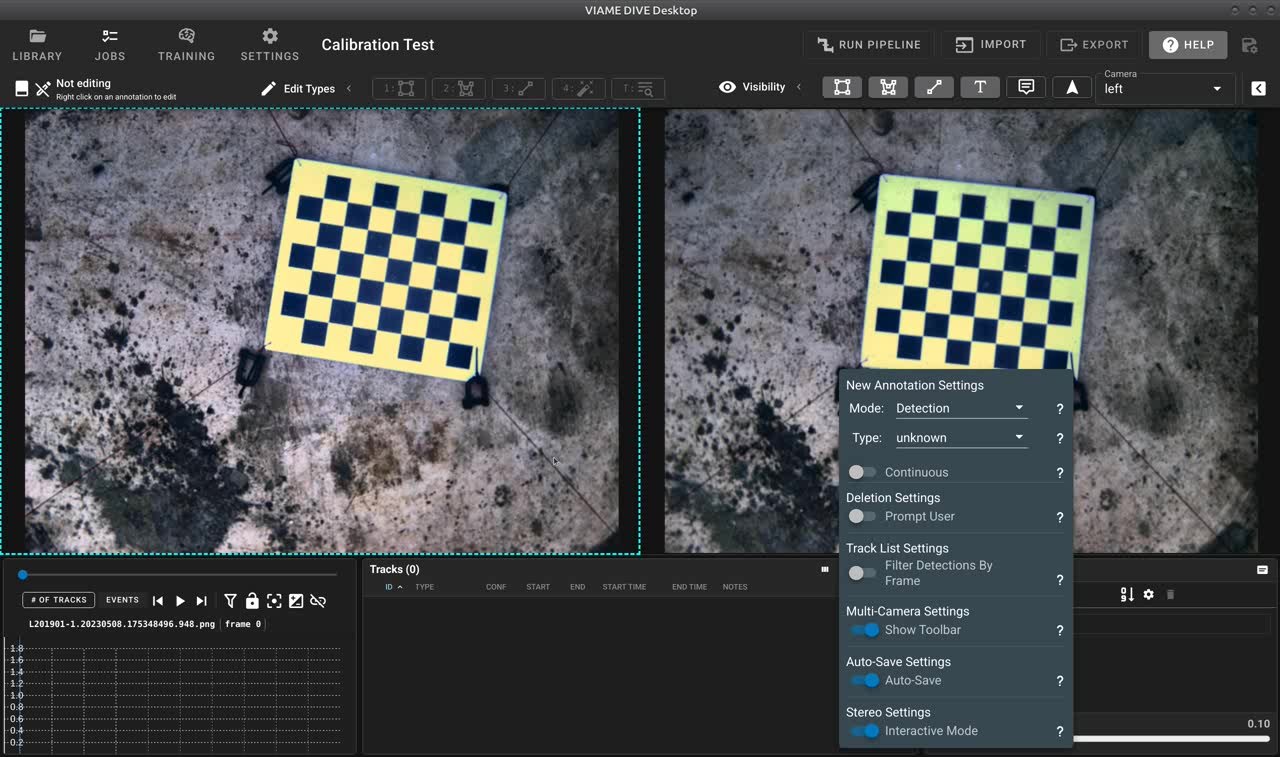
Setting up interactive stereo measurement in DIVE with multi-camera settings.
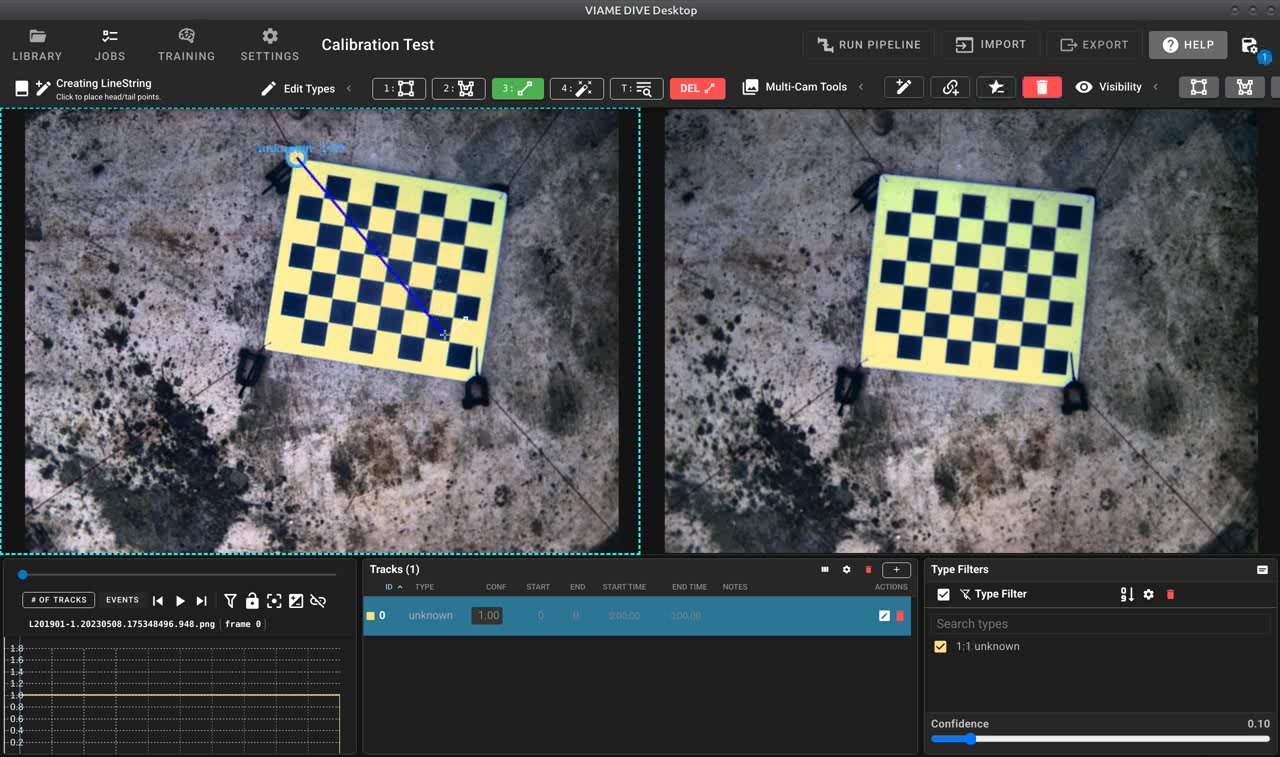
Creating stereo annotations interactively – the user draws on one camera view.
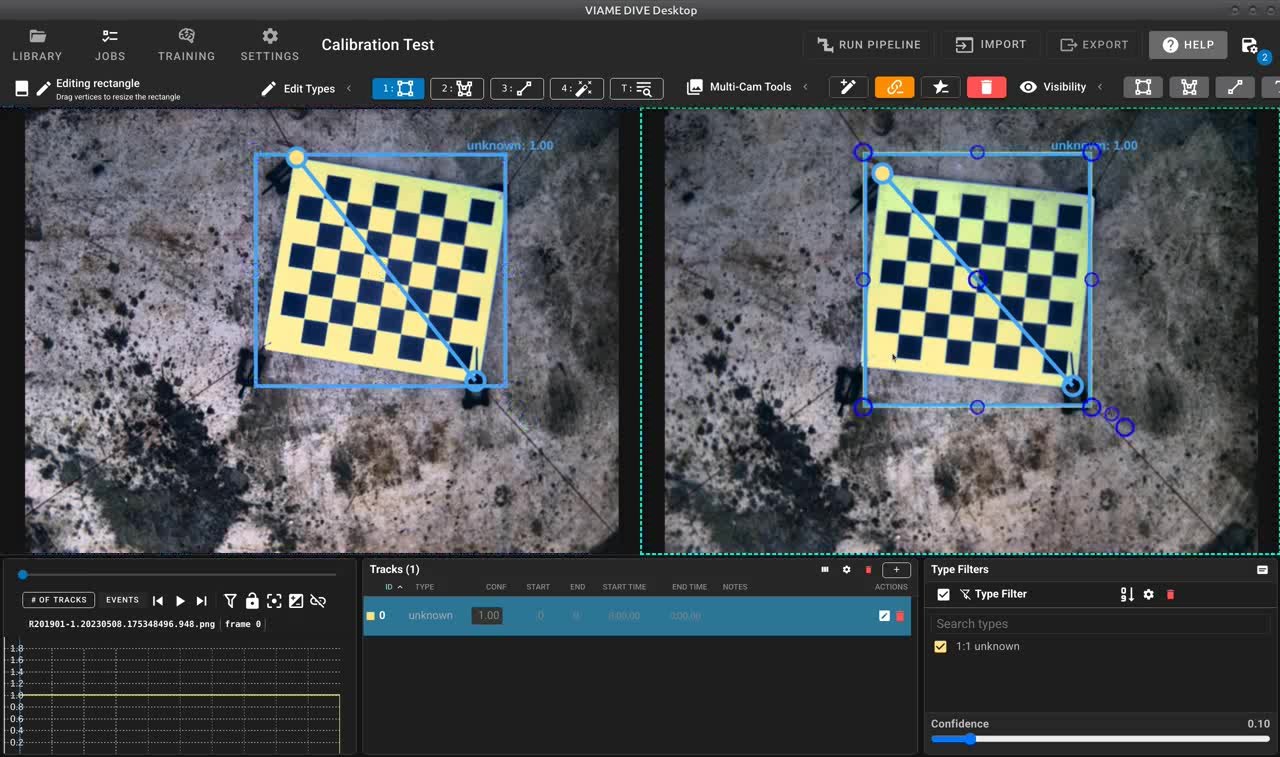
Stereo correspondences with epipolar geometry shown across left and right views.
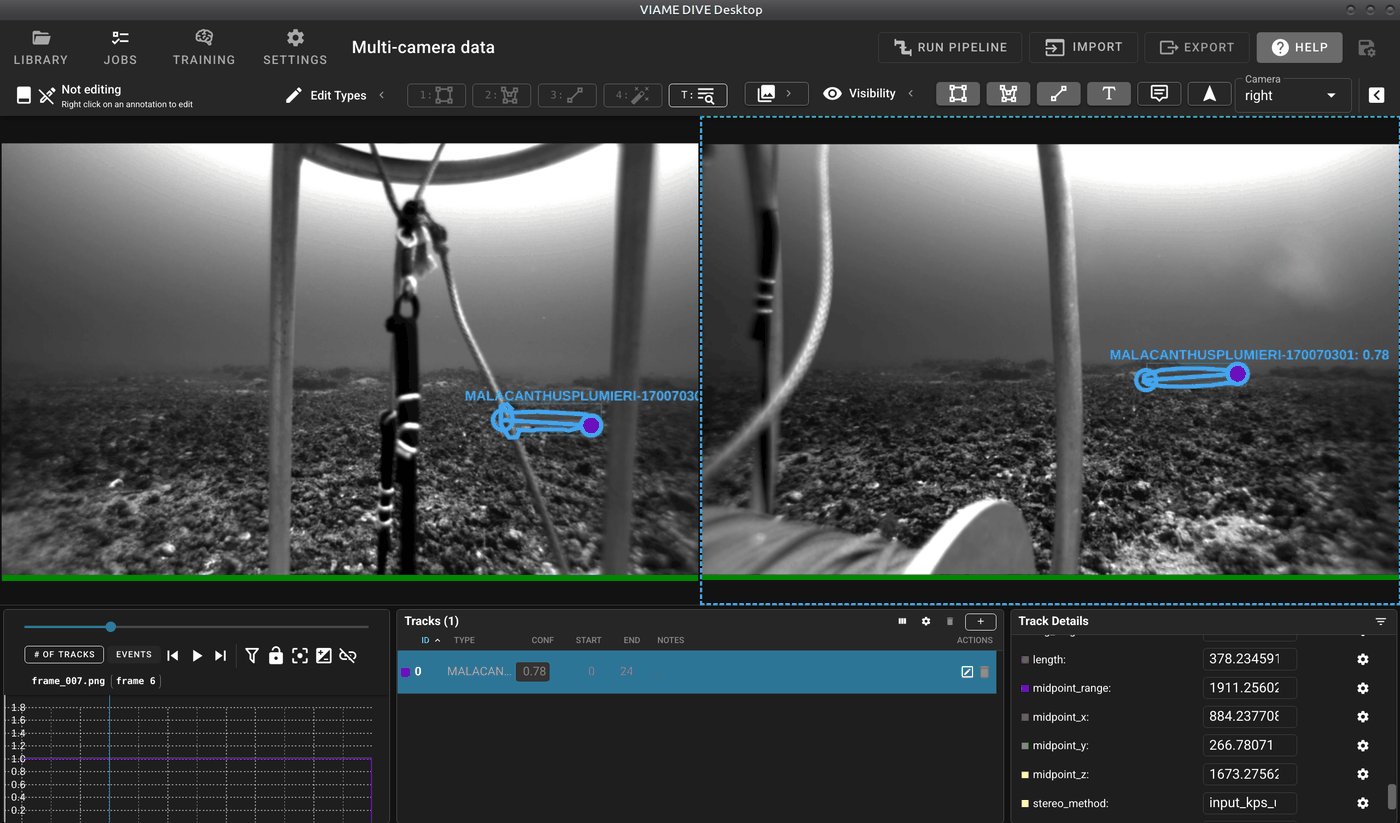
Stereo measurement results in DIVE showing detected objects with computed lengths displayed in the Track Details panel.
stereo_measure_current_annots_default.pipe
The default measurement-from-annotations pipeline. Uses Foundation Stereo (if the add-on is installed) for disparity estimation and ORB feature matching for stereo correspondence. Reads annotation files for both cameras, pairs detections, and outputs measured tracks to computed_tracks2.csv.
stereo_measure_current_annots_fdn_stereo_s.pipe (Foundation Stereo add-on)
Uses the Foundation Stereo deep learning model (small variant) for high-quality disparity estimation. Recommended when the Foundation Stereo add-on is installed, as it generally produces more accurate measurements than traditional methods.
stereo_measure_current_annots_ncc_dino.pipe (DINO add-on)
Uses DINO visual features for template matching between left and right camera views, with NCC (Normalized Cross-Correlation) as a secondary matching stage. Can produce better correspondence in challenging cases where ORB features are insufficient.
stereo_measure_current_annots_seagis.pipe (SEAGIS add-on)
Uses the SEAGIS StereoLibLX library with .CamCAL calibration files for stereo measurement. Supports epipolar template matching as a fallback when only one camera has annotated keypoints. Use this pipeline if your calibration data is in the SEAGIS format.
Fully Automatic Measurement Pipelines
These pipelines perform end-to-end automatic detection and measurement without requiring any manual annotations.
stereo_track_and_measure_default_fish.pipe
Fully automatic fish detection, tracking and measurement pipeline. Runs the default fish detector (boxes, masks and head/tail keypoints) and a tracker on both stereo cameras, pairs left and right tracks, averages each pair’s classification, and triangulates the head/tail keypoints into lengths that are aggregated per track. Outputs measured tracks to computed_tracks1.csv and computed_tracks2.csv.
stereo_detect_and_measure_default_fish.pipe
Same detector without a tracker: left and right detections are paired and measured independently on every frame, each pair sharing one track ID and an averaged classification.
stereo_detect_and_measure_gmm_motion.pipe
Automatic measurement pipeline using GMM (Gaussian Mixture Model) background subtraction to detect moving objects. Computes oriented bounding boxes for measurement. Best suited for stationary camera setups where fish swim through the field of view.
Robust Disparity Segment Measurement
stereo_measure_current_annots_sgbm.pipe measures existing head-tail annotations using OpenCV SGBM/WLS and the shared compute_measurements process. It fits a disparity profile along each annotated segment, reconstructs the endpoint correspondences, and uses the existing triangulation, stereo track pairing, CSV output, and median track-length aggregation. Length units follow the calibration translation vector.
The default fit uses 11 samples and permits at most 3 invalid or outlier samples, with a maximum disparity residual of 1 pixel. These are controlled by disparity_segment_samples, disparity_segment_max_outliers, and disparity_segment_max_error on the measurer. The neighborhood radius for each sample is refine_keypoints_disparity_window (default 7 pixels). The fit requires at least three inliers, a strict majority of the requested samples, and support spanning at least half the segment. The model assumes a straight 3D head-tail segment and fits in disparity space to account for perspective when its endpoints have different depths.
Whether refinement touches a track that already has right head-tail keypoints is set by disparity_keypoint_policy (shared with per-point refinement): keep_existing (default) measures from the given keypoints and only generates right keypoints for tracks lacking them; refine_unless_user replaces tracker keypoints but keeps hand-placed lines (stereo_user_line); refine_all replaces them regardless. A rejected refinement always falls back to the existing keypoints. The same policy, sampling and fit keys apply to the Foundation Stereo add-on pipelines.
Stereo Measurement Settings
The compute_measurements process, named measurer in the stereo pipelines, decides which detections are paired across cameras, how the matching right-camera points are found, and which tracks are written out. Its settings can be edited in the pipeline file or overridden for a single run with -s:
kwiver runner configs/pipelines/stereo_track_and_measure_default_fish.pipe \
  -s measurer:min_track_states=0
The defaults below are those of the process itself. A pipeline file may set its own values, so check the measurer block of the pipeline being run.
Which detections are written
| Setting | Default | Effect |
|---|---|---|
min_track_states |
0 | Drops every track with fewer detections than this, counted across both cameras: a detection seen in both cameras counts as two. Measurement still runs on every frame, this only controls which tracks reach the output. Set to 0 to keep every detection. |
output_unmatched |
true | Writes tracks that were not paired with the other camera as separate tracks with their own IDs. When false only matched pairs are written. |
min_track_length, max_track_length |
0 | Drops tracks with fewer or more detections than this. 0 disables the filter. |
min_avg_surface_area, max_avg_surface_area |
0 | Drops tracks whose average box area in pixels falls outside the range. 0 disables the filter. |
create_synthetic_detections |
true | For a left detection with no partner in the right camera, creates a right box around the points found by matching_methods. Set to false to keep the right camera output to what the detector produced; left-only tracks are then not measured. |
If a stereo pipeline returns fewer detections than the same detector run on a single camera, min_track_states is the first setting to check. Short tracks are common when frames are far apart in time.
Finding the right-camera points
matching_methods is a comma-separated list of methods for locating the head and tail in the right camera when a left track has no right keypoints. They are tried in the order given until one succeeds. The default is input_pairs_only,template_matching.
| Method | Finds the right-camera points by |
|---|---|
input_pairs_only |
Using the keypoints already present on the paired right detection |
depth_projection |
Projecting the left points at the fixed default_depth |
external_disparity |
Reading a disparity map supplied on the disparity_image port |
compute_disparity |
Computing a disparity map from the rectified images with the configured stereo_disparity algorithm |
template_matching |
Rectifying the images and searching along the epipolar line |
epipolar_template_matching |
Searching along the epipolar line in the unrectified images, with the descriptor set by epipolar_descriptor_type |
feature_descriptor |
Detecting and matching image features |
ransac_feature |
Matching image features and filtering them with a RANSAC fundamental matrix estimate |
Listing input_pairs_only alone measures only detections that carry head and tail keypoints in both cameras, and never searches for or creates right-camera points.
Note
The deep stereo backends return disparity as a 16-bit image scaled by 256, which cannot hold a disparity above 256 pixels. Anything nearer than focal_length * baseline / 256 is therefore measured at the wrong range rather than rejected.
Pairing left and right detections
| Setting | Default | Effect |
|---|---|---|
detection_pairing_method |
empty | Pairs left and right detections that do not share a track ID. Empty disables pairing. Options are iou, calibration, feature_matching, epipolar_iou and keypoint_projection; a comma-separated list runs each in turn on what is still unpaired. |
detection_pairing_threshold |
0.1 | Minimum overlap for iou and epipolar_iou, maximum reprojection error in pixels for calibration, and maximum average keypoint distance in pixels for keypoint_projection. |
detection_pairing_require_class_match |
true | Only pairs detections whose top class labels agree. |
accumulate_track_pairings |
false | Collects pairings over the whole sequence and resolves them once at the end, so output track IDs do not change part way through. |
pairing_resolution_method |
most_likely |
most_likely keeps the right track seen most often with each left track. split makes a separate track for each consistent run. |
detection_split_threshold |
3 | Frames a left and right track must be paired in before the pairing is accepted. Raise it in crowded scenes. |
max_stereo_rms |
off | Rejects a pairing whose triangulation error in pixels is above this. A typical value is 20. |
max_bbox_y_center_offset |
off | Rejects a pairing whose box centers differ in height by more than this many pixels. A typical value is 30 for a side-by-side rig. |
max_bbox_area_ratio |
off | Rejects a pairing whose boxes differ in area by more than this ratio. A typical value is 3. |
The last three settings only stop a pairing from joining two tracks under one ID. The detections are still written, and a length computed for that frame is still recorded on them.
What is recorded
| Setting | Default | Effect |
|---|---|---|
length_aggregation_method |
none |
Combines the per-frame lengths of a paired track into an avg_length attribute using average, average_iqr or median. |
average_stereo_classes |
false | Gives both cameras of a paired track the same averaged classification. |
class_averaging_method |
weighted_average |
weighted_average, simple_average or weighted_scaled_by_conf. |
class_averaging_ignore_class |
empty | A class left out of the average whenever other classes are present. |
record_head_tail_locations |
false | Adds the head and tail 3D positions as head_x, head_y, head_z, tail_x, tail_y and tail_z. |
record_stereo_method |
true | Adds a stereo_method attribute naming the method that produced the measurement. |
update_right_keypoints |
true | Writes refined right keypoints back to the output. When false they are only used to compute the length. |
Curved fish measurement (opt-in)
The Python stereo service supports a separate measure_curve command. It uses dense disparity from FoundationStereo, Fast FoundationStereo, or another configured disparity backend. Existing line measurements and pipelines keep working as before. This is a service/API and offline utility; the annotation UI does not automatically generate or display these curves.
Inputs must already be rectified, with masks, curves, disparity and calibration all on the same full-resolution image grid. Use the intrinsics produced by rectification, not the original distorted camera intrinsics. The supported rectified model has shared fx, fy and cy, potentially different horizontal principal points, and a positive horizontal baseline. Lengths use the baseline’s units. Underwater measurements require calibration appropriate to the camera housing and medium.
After enabling the dense stereo service and waiting for disparity_ready, send a request such as:
{
  "command": "measure_curve",
  "left_image_path": "/data/left.png",
  "right_image_path": "/data/right.png",
  "rectified_calibration": {
    "rectified": true,
    "fx": 1000, "fy": 1000,
    "cx_left": 640, "cx_right": 640, "cy": 360,
    "baseline": 0.12
  },
  "left_curve": [[300, 300], [340, 280], [390, 285], [440, 320]],
  "right_curve": [[260, 300], [300, 280], [350, 285], [400, 320]],
  "options": {
    "mode": "bidirectional",
    "samples": 32,
    "smoothing": 0.5,
    "consistency_px": 1.5,
    "centerline_tolerance_px": 5.0,
    "max_length_disagreement": 0.1,
    "max_depth_ratio": 2.0
  }
}
Frame paths must identify the current frame; for video, also supply its current frame_time. Requests before disparity is ready fail and can be retried. The command is also routed by the unified interactive service.
The modes are:
left(default): resample the left centerline and transfer each point using dense disparity. A supplied right centerline constrains the transfer by proximity; equal fractions of two independently drawn curves are not assumed to correspond.bidirectional: additionally compute independent right-reference disparity by swapping and horizontally flipping the stereo images, then unflipping the result. Both centerlines are sampled independently, with a round-trip disparity check at every sample. Average the two reconstructed lengths only if their relative disagreement is within the configured threshold. This adds one model inference per request; the reverse result is not cached. The backend must support normal horizontal rectified stereo and output disparity, not depth.
Instead of left_curve or right_curve, supply left_mask_path or right_mask_path and the corresponding left_endpoints or right_endpoints as [[head_x, head_y], [tail_x, tail_y]]. Masks are binary full-image rasters (nonzero means fish), for example exported SAM2 masks; bounding-box-local masks must first be placed on the full-image grid. Endpoint anchors can come from SLEAP. Mask extraction requires scikit-image, included in PyTorch builds. The shortest connected skeleton path between anchor locations removes side branches such as fins. Disconnected anchor paths fail. Masks can also accompany explicit curves to check that every matched sample stays inside the fish.
smoothing is the 2D spline fit tolerance in pixels; endpoints are retained. The reported length is the sum of 3D segment lengths between sampled points, not a spline integral. More samples are not necessarily more accurate: depth noise can inflate length, while too few samples underestimate sharp bends. Defaults are starting points for validation, not calibrated uncertainty bounds. Silhouette centerlines and visible surface disparity approximate the anatomical midline, especially when fish roll or bend out of the image plane. Bidirectional agreement alone does not establish anatomical accuracy. Define the tail landmark consistently (base, fork or tip), and validate against known lengths and poses.
Responses contain curved_length, straight_length, curvature_ratio, per-direction 3D points and transferred image points, and round-trip/length agreement diagnostics. Invalid or out-of-image disparity, mask violations, inconsistent matches or excessive depth range produce success: false with no top-level curved length. Missing samples are never bridged or replaced by a straight-line result. Existing detection length fields are not overwritten.
Offline processing of saved disparity maps is also available:
python -m viame.core.curved_measurement request.json --output measurement.json
Use the same JSON fields as above, adding left_disparity_path and, for bidirectional mode, right_disparity_path to NumPy .npy maps. Offline maps must already be computed; this utility does not load a model. Set disparity_scale to 256 for VIAME uint16 disparity, or 1 (default) for floating point pixel disparity. Both maps represent the positive quantity x_left - x_right, indexed on their respective source image grids; a negated right disparity map must be converted first. All paths are resolved against the working directory. Independent right disparity also enables round-trip checking in offline left mode.
Batch pipeline
stereo_measure_current_annots_spline_generic.pipe (fast-fdn-stereo add-on) measures every annotated centerline in a stereo dataset with the compute_curved_measurements process. Each left vertex is transferred to the right camera through Fast-Foundation-Stereo disparity on the rectified grid; in the default bidirectional mode a second inference on the swapped, flipped pair yields an independent right-reference disparity, every vertex must round trip within consistency_px, and the two curve lengths must agree. Right detections lacking a centerline receive the transferred vertices (and are created when missing); an annotated right centerline constrains the transfer and is kept as drawn unless right_keypoint_policy is refine_all. Measured detections carry length, curved_length, straight_length and curvature_ratio attributes, and the per-track aggregate is written as avg_length. Frames whose transfer fails any check keep no length.
A detection without drawn spine vertices gets its centerline from its mask (polygon): the skeleton path between head and tail, smoothed and resampled to centerline_vertices points, is written back as head, spine_NNN, tail keypoints on the left camera and transferred to the right, so DIVE shows the curve on both. Head and tail come from the annotation when present and from the mask’s hull extremes otherwise. Stray mask fragments and holes are removed first. Boxes with neither mask nor endpoints stay unmeasured by this pipe; stereo_measure_current_annots_spline_fish.pipe (default-fish add-on, also needs fast-fdn-stereo) runs the RF-DETR segmentation and keypoint heads inside the measurer first, so boxes alone are enough there. centerline_source restricts the choice to keypoints or mask.
Editable DIVE centerlines
The matching DIVE feature/curved-headtail-lines branch extends the existing line editor with segment midpoint handles. Interior vertices use named keypoints spine_001, spine_002, etc., between head and tail. VIAME’s CSV and DIVE JSON readers/writers preserve these markers and subpixel coordinates; JSON uses the existing HeadTails LineString. No new KWIVER geometry type is required.
measure_curve responses also provide left_keypoints and right_keypoints dictionaries containing named points for export through these writers. In DIVE, editing a multi-point line invokes measure_line with an ordered array of vertices per camera. The service detects this form and rematches samples along the polyline before summing triangulated segment lengths. Vertex indices across independently edited camera views are never assumed to match. The original two-endpoint request keeps its existing behavior. The editor path uses a polyline (no spline smoothing), while measure_curve retains its configurable smoothing and bidirectional options.
Running the Example Scripts
Run CMake to automatically download the demo data into this example folder. Alternatively you can download the demo data directly.
Setup:
For simplicity this tutorial will assume that the VIAME source directory is [viame-source] and the build directory is [viame-build]. Please modify these as needed to match your system setup. We also assume that you have built VIAME.
Additionally this example requires an extra python dependency to be installed. On Linux or Windows, ‘pip install ubelt’.
Available Scripts
This example folder contains several scripts for different measurement workflows. Each script is available in both Linux (.sh) and Windows (.bat) versions.
calibrate_cameras
Runs the camera calibration tool to compute stereo camera calibration parameters from a video or set of images containing a chessboard calibration pattern. Outputs a JSON file (calibration_matrices.json) compatible with the VIAME measurement pipelines. Usage: ./calibrate_cameras.sh <video_file_or_image_glob>
measure_via_gmm_oriented_boxes
Runs the automatic GMM (Gaussian Mixture Model) motion-based measurement pipeline. This pipeline uses background subtraction to detect moving objects and computes oriented bounding boxes for measurement. Best suited for scenarios with stationary cameras and moving fish.
measure_via_default_fish
Runs the default automatic fish measurement pipeline using a neural network-based fish detector. This pipeline detects fish using a trained model and performs stereo measurement on the detected objects.
measure_over_manual_annotations
Runs measurement on user-provided annotations. Use this when you have manually annotated fish locations and want to compute measurements from those annotations rather than using automatic detection.
gmm_standalone_tool
A standalone tool for GMM-based measurement that includes disparity computation. This script provides more control over the measurement process and can be used for debugging or custom workflows.
compute_depth_maps
Computes stereo disparity/depth maps from the calibrated stereo camera imagery. Useful for visualizing the depth information or for custom processing workflows.
Running via the pipeline runner
To run the process using the sprokit C++ pipeline we use the the pipeline runner:
# First move to the example directory
cd [viame-build]/install/examples/stereo_measurement

# The below script runs pipeline runner on the GMM motion-based measurement
bash measure_via_gmm_oriented_boxes.sh
This example runs at about 4.0Hz, and takes 13.3 seconds to complete on a 2017 i7 2.8Ghz Dell laptop.
Running via installed opencv python module
The above pipeline can alternatively be run as a python script.
# move to your VIAME build directory
cd [viame-build]
# Run the setup script to setup the proper paths and environment variables
source install/setup_viame.sh

# you may also want to set these environment variables
# export KWIVER_DEFAULT_LOG_LEVEL=debug
export KWIVER_DEFAULT_LOG_LEVEL=info
export SPROKIT_PYTHON_MODULES=kwiver.processes:viame.processes
You should be able to run the help command
python -m viame.opencv.stereo_demo --help
The script can be run on the demodata via
python -m viame.opencv.stereo_demo \
    --left=camtrawl_demodata/left --right=camtrawl_demodata/right \
    --cal=camtrawl_demodata/cal.npz \
    --out=out --draw -f
Running via the standalone script
Alternatively you can run by specifying the path to opencv module (if you have a python environment you should be able to run this without even building VIAME)
# First move to the example directory
cd [viame-source]/examples/stereo_measurement

# Run the stereo_demo module directly via the path
python ../../plugins/opencv/stereo_demo.py \
    --left=camtrawl_demodata/left --right=camtrawl_demodata/right \
    --cal=camtrawl_demodata/cal.npz \
    --out=out --draw -f
Without the --draw flag the above example, this example runs at about 2.5Hz, and takes 20 seconds to complete on a 2017 i7 2.8Ghz Dell laptop.
With --draw it takes significantly longer (it runs at 0.81 Hz and takes over a minute to complete), but will output images like the one below as well as a CSV file.
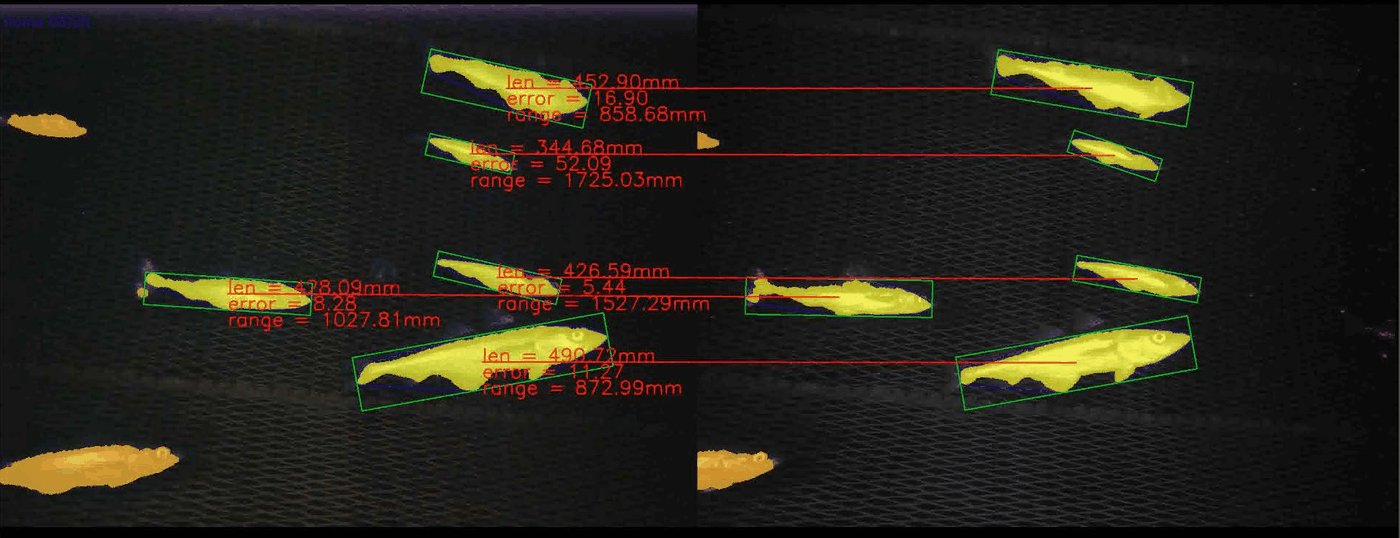
Note that the KWIVER C++ Sprokit pipeline offers a significant speedup (4Hz vs 2.5Hz), although it currently does not have the ability to output the algorithm visualization.
DIVE Documentation
DIVE multicamera and stereo data covers loading stereo pairs, and the DIVE annotation quickstart covers drawing the head/tail lines that carry length.
Code and Build Flags
Flags to enable when building VIAME from source for this example:
VIAME_ENABLE_OPENCVVIAME_ENABLE_PYTHONVIAME_ENABLE_PYTORCHVIAME_ENABLE_PYTORCH-RF-DETRVIAME_ENABLE_VXL
Add-ons providing the pipelines or models used: default-fish.
Command line tools:
- tools/calibrate.py –
viame calibrate
Pipeline and configuration files:
- configs/pipelines/filter_stereo_depth_map.pipe
- configs/pipelines/stereo_measure_current_annots_default.pipe
- configs/add-ons/default-fish/stereo_track_and_measure_default_fish.pipe
- configs/pipelines/stereo_detect_and_measure_gmm_motion.pipe
- configs/pipelines/stereo_calibrate_cameras_default.pipe
- configs/pipelines/stereo_calibrate_cameras_fast.pipe
- configs/pipelines/utility_calibrate_single_camera.pipe
- configs/pipelines/utility_calibrate_stitched_stereo_pair.pipe
- configs/pipelines/stereo_compute_rectified_disparity.pipe
- configs/add-ons/fdn-stereo/stereo_measure_current_annots_fdn_stereo_s.pipe
- configs/add-ons/dino3/stereo_measure_current_annots_ncc_dino.pipe
- configs/add-ons/seagis/stereo_measure_current_annots_seagis.pipe
- configs/add-ons/default-fish/stereo_detect_and_measure_default_fish.pipe
- configs/pipelines/stereo_measure_current_annots_sgbm.pipe
- configs/add-ons/fast-fdn-stereo/stereo_measure_current_annots_spline_generic.pipe
- configs/add-ons/default-fish/stereo_measure_current_annots_spline_fish.pipe
Source code:
- plugins/core/bytetrack_tracker.py
- plugins/core/measure_objects_process.cxx
- plugins/core/refine_detections_nms.cxx
- plugins/core/refine_tracks_average_tot.cxx
- plugins/opencv/compute_stereo_disparity.cxx
- plugins/opencv/enhance_images.cxx
- plugins/opencv/measure_objects_process.cxx
- plugins/opencv/split_image_horizontally.cxx
- plugins/opencv/warp_image_ocv.cxx
- plugins/pytorch/rf_detr_detector.py